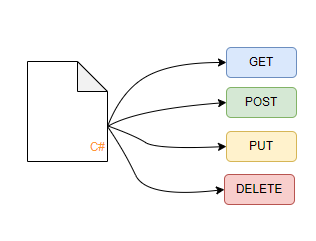
These days there's a rising demand to reduce boilerplate code in apps, more and more tools are appearing reducing backend code even further, such as Hasura's automatic creation of GraphQL APIs.
Here's a somewhat different approach to this.
What if someone says that this is the full code needed for a fully working CRUD API with ODATA filter options enabled?
   [GeneratedController("/people")]
   public class Person : Trackable, IObjectBase<Guid>
   {
      public string Name { get; set; }
      public DateTime Date { get; set; }
      public string Description { get; set; }
      public int Age { get; set; }
public IEnumerable<PersonLink> Links { get; set; }
public Guid Id { get; set; }
}
Sounds a bit crazy but yea, its already done and availble...sort of. There's no Nuget package yet but you can go to Github and grab the code if you want to.
An API created like this has everything done automatically, all CRUD Endpoints, fully routing, even Authorization is working. Besides various things like caching and even webhooks once implemented.
A lot of this is still in early alpha tho.
The class will generate these routes:
| Method | Endpoint |
| GET | /people |
| GET | /people/{id] |
| POST | /people |
| DELETE | /people/{id} |
Besides that you'll have the known ODATA filter options like $filter, $select etc
But lets tell you a bit about how this is done.
The whole API Generator is built with EntityFramework Core, .Net Core and the Microsoft ODATA Libraries. Thats pretty much it.
The first step to achieve what I wanted to is to get the EFCore pieces done, have the DBContext generated at runtime fully working with all possible options available.
After digging a bit into things I figured that this is actually quite easy.
EntityFramework offers various ways to generate the DBContext and DBSchema. You're probably familiar with the usual OnModelCreating and ModelBuilder approaches.
Something like this:
      protected override void OnModelCreating(ModelBuilder builder)
      {
         builder.Entity<Person>().HasKey("ID");
         base.OnModelCreating(builder);
      }
In my case, I don't know any of the classes at design time as the code is not in my library but in the code of whoever uses my tools. I needed a different approach. Luckily EntityFramework offers two really nice options here.
- ApplyConfigurationsFromAssembly
- Allows you to extract the builder code and OnModelCreating into any class implementing IEntityTypeConfiguration
- builder.Entity(type)
- Allows you to add an entity to the builder of any type, with reflection we can extract types from the calling assembly and use these here
By using these two options i was able to rewrite OnModelCreating to this:
      protected override void OnModelCreating(ModelBuilder builder)
      {
         // Add all types T using IEntityTypeConfiguration
         builder.ApplyConfigurationsFromAssembly(Assembly.GetEntryAssembly());
// Add all other types (auto mode)
var customTypes = Assembly.GetEntryAssembly().GetExportedTypes()
.Where(x => x.GetCustomAttributes<GeneratedControllerAttribute>().Any());
foreach (var customType in customTypes.Where(x => x.GetInterface("IEntityTypeConfiguration`1") == null))
builder.Entity(customType);
base.OnModelCreating(builder);
}
So what are we doing here?
We first of all take all Types implementing IEntityTypeConfiguration and apply their EntityConfiguration. Whatever class is using this only needs to implement the "Configure" function.
        public void Configure(EntityTypeBuilder<Person> builder)
        {
           //default stuff if nothing special
        }
This gets called from the OnModelCreating function and gets handled automatically by EntityFramework. When you work normally with EntityFramework you often don't want to configure the entities yourself and just let EF do its magic, this is also possible just a bit more tricky. By using reflection we want to grab all types that do NOT implement IEntityTypeConfiguration and just add them to EFCore. This is what happens here:
         // Add all other types (auto mode)
         var customTypes = Assembly.GetEntryAssembly().GetExportedTypes()
            .Where(x => x.GetCustomAttributes<GeneratedControllerAttribute>().Any());
         foreach (var customType in customTypes.Where(x => x.GetInterface("IEntityTypeConfiguration`1") == null))
            builder.Entity(customType);
You might see, theres a clause limiting the types to all types with a "GeneratedControllerAttribute" this is what my library uses to idenfity the actual classes used, otherwise we where not able to limit the results just to the classes we really want. The GeneratedControllerAttribute is further used to configure the output of the generated API, here's the definition:
      /// <summary>
      ///    Attribute defining auto generated controller for the class
      /// </summary>
      /// <param name="route">The full base route for the class ie /myclass/ </param>
      /// <param name="requiredReadClaims"></param>
      /// <param name="requiredWriteClaims"></param>
      /// <param name="requiredRolesRead"></param>
      /// <param name="requiredRolesWrite"></param>
      /// <param name="fireEvents"></param>
      /// <param name="authorize"></param>
      /// <param name="cache"></param>
      /// <param name="cacheDuration"></param>
      public GeneratedControllerAttribute(
         string route,
         string[] requiredReadClaims = null,
         string[] requiredWriteClaims = null,
         string[] requiredRolesRead = null,
         string[] requiredRolesWrite = null,
         bool fireEvents = false,
         bool authorize = true,
         bool cache = false,
         int cacheDuration = 50000)
      {
Once i was able to find all the types i wanted to use, it was just a matter of adding these as entities to EFCore. Thats about the DBContext part.
The rest that was needed was actually far easier than i expected, using dependency injection and generic types.
I created two classes, a generic repository and a generic controller
   public interface IGenericRespository<T, TEntityId> : IDisposable
   {
      IQueryable<T> Get();
T Get(TEntityId id);
Task<T> GetAsync(TEntityId id);
void Create(T record);
void Update(T record);
void Delete(TEntityId id);
int Save();
Task<int> SaveAsync();
}
Accessing the data in EF is rather simple, here's the Get implementation:
      public TEntity Get(TEntityId id)
      {
         return Get().SingleOrDefault(e => e.Id.ToString() == id.ToString());
      }
Posting the full controller here is quite long so i'll only post the ctor and class as such:
   [Route("api/[controller]")]
   [Produces("application/json")]
   public class GenericController<T, TEntityId> : ODataController
      where T : class,
      IObjectBase<TEntityId>
   {
      public GenericController(IAuthorizationService authorizationService, IGenericRespository<T, TEntityId> repository)
      {
         _repository = repository;
         _authorizationService = authorizationService;
ConfigureController();
}
What the hell does IObjectBase<TEntityId> actually do here?
For many things in here you need to know what the primary key of the class is, EntityFramework needs it and the controller as well. As i wanted to allow people to use whatever type they want to use I added a simple interface:
   public interface IObjectBase<TId>
   {
      [Key]
      [DatabaseGenerated(DatabaseGeneratedOption.Identity)]
      TId Id { get; set; }
   }
By using this people can choose whatever primary key (string, int or guid) they want to have and i know what the type is and have an easier time actually using it.
Putting it all together
So now that we have all the moving parts or at least the basics, we need to actually put things together. How can we actually use our generic controller? This is where .NET Core Application Parts and Feature Provider comes in, read more here
By writing our own ApplicationPart we can easily do what we're trying to achieve. I wrote an extension method to IMVCBuilder to initialize everything during app startup. Yes, right now it only works during startup and not fully dynamic but thats step2.
For initialization you need to pass your feature provider to the AddMvc method, similar to this:
         services.AddMvc(o =>
               o.Conventions.Add(new GenericControllerRouteConvention()))
                  .ConfigureApplicationPartManager(m =>
                     m.FeatureProviders.Add(new GenericTypeControllerFeatureProvider(new[] {assembly.FullName}))
The GenericControllerRouteConvention is one of the main part to allow the routing engine to work for dynamically generated controllers. While we only have one "Generic Controller" instances are getting added for each type we have added to the app. And the router needs to know which route the controller is listening to. This is how the RouteConvention looks right now and again we're using our GeneratedControllerAttribute here to configure the routing behaviour, controller name etc. This is important as this part is later also used by the Swagger implementation to create the OpenAPI Spec.
      public void Apply(ControllerModel controller)
      {
         if (controller.ControllerType.IsGenericType)
         {
            var genericType = controller.ControllerType.GenericTypeArguments[0];
            var customNameAttribute = genericType.GetCustomAttribute<GeneratedControllerAttribute>();
            controller.ControllerName = genericType.Name;
if (customNameAttribute?.Route != null)
{
if (controller.Selectors.Count > 0)
{
var currentSelector = controller.Selectors[0];
currentSelector.AttributeRouteModel = new AttributeRouteModel(new RouteAttribute(customNameAttribute.Route));
}
else
{
controller.Selectors.Add(new SelectorModel
{
AttributeRouteModel = new AttributeRouteModel(new RouteAttribute(customNameAttribute.Route))
});
}
}
}
}
The RouteConvention is not the only part, the second part is the actual FeatureProvider I had to implement. The provider is the magic part that actually goes through the assembly, fetches the types with our attribute and adds a controller "feature" for each. (note: we excluded BaseController here as thats our generic one we don't need twice)
      public void PopulateFeature(IEnumerable<ApplicationPart> parts, ControllerFeature feature)
      {
         foreach (var assembly in Assemblies)
         {
            var loadedAssembly = Assembly.Load(assembly);
            var customClasses = loadedAssembly.GetExportedTypes().Where(x => x.GetCustomAttributes<GeneratedControllerAttribute>().Any());
foreach (var candidate in customClasses)
{
// Ignore BaseController itself
if (candidate.FullName != null && candidate.FullName.Contains("BaseController")) continue;
// Generate type info for our runtime controller, assign class as T
var propertyType = candidate.GetProperty("Id")?.PropertyType;
if (propertyType == null) continue;
var typeInfo = typeof(GenericController<,>).MakeGenericType(candidate, propertyType).GetTypeInfo();
// Finally add the new controller via FeatureProvider ->
feature.Controllers.Add(typeInfo);
}
}
}
And thats about it first of all, having all these parts combined and added you'd now get an already working API when running the app.
You can find a small sample app demonstrating the functionality here: https://github.com/DeeJayTC/net-dynamic-api/tree/main/sample/ApiGeneratorSampleApp