In the last days I often saw questions related to appsettings. Thats something many people still have concerns about or are unsure how to handle things properly.
This is my approach to do that
Lets try to walk through it:
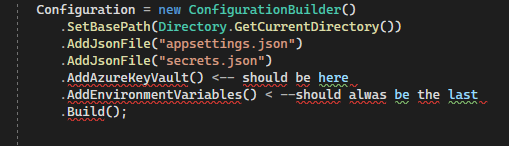
This is a piece of code i usually have in my apps responsible for loading your app configuration.
Configuration = new ConfigurationBuilder()
    .SetBasePath(Directory.GetCurrentDirectory())
    .AddJsonFile("appsettings.json")
    .AddJsonFile($"appsettings.{env.Name}.json")
    .AddJsonFile("secrets.json")
    .AddAzureKeyVault() <-- should be here
    .AddEnvironmentVariables() < --should alwas be the last
    .Build();
The first two parts are pretty self explainatory, you just tell your app where to look for the files so you don't have to use long paths. In this case we say that all json files are in "CurrentDirectory" which is the base directory of your app.
- AddJsonFile("appsettings.json")
appsettings.json should always only include settings that are valid for all app instances, no matter if development or production.
This is where you put generic settings, something that applies to every developer and all people working with your code. - AddJsonFIle("appsettings.{env.Name}.json")
This is where some of the magic of configuration happens, you might have noticed that you have more than one app settings file in your app.
Usually something like this:
"appsettings.development.json"
"appsettings.production.json"
"appsettings.staging.json"
these files get loaded depending on the environment you're currently in and override the prior loaded config if there's matching keys.
Lets say you have this in your appsettings.json"Logging": { "LogLevel": { "Default": "Information", "Microsoft": "Warning", "Microsoft.Hosting.Lifetime": "Information" } },
These are general settings that should apply if not overwritten anywhere else. Now, in the development settings we could have something like this:
"Logging": { "LogLevel": { "Default": "Verbose", } }This would mean that while you're in development , the log settings are way more verbose and you overwrite the normal app settings by doing this.
Have in mind that this only works because the order of loading configuration files is important. Each key gets overwritten by the same key if loaded later.
Thats also why Environmental variables should come last, but we'll get to this. - AddJsonFile("secrets.json")
The secrets.json is what i usually use to store local development secrets, nothing too private but also something that might be personal per developer. Best is to not include this file in your repository and just add it to .gitignore. This is where your devs can add their own settings which should not collide with anyone else.
- AddAzureKeyVault
The AzureKeyVault is where usually private keys, settings, url's and otherwise confidential stuff can be stored for your production apps. Usually you don't have a key vault locally and this setting only applies to production. As this comes late in the chain it will overide all prior app settings. When hosting an app on azure you should use this for client secrets, client ids, database connection strings and whatever else should be secret
Here's a guide taken from Microsoft Docs - AddEnvironmentalVariables()
The last bit in the picture are environmental variables, you might see it differently but in my case i always want the env vars to override everything else, mostly for containerization reasons. Env vars are whats primary used to configure applications inside Docker. But Helm Charts and Kubernetes also play a big role here. When deploying containers you often work with deployment scripts and set things on a more global level, really often using environmental vars in like docker-compose files.
It happened often in past that the settings did not have any effect leading to confusion because some appsetting was overwriting the environmental variables. Thats why I decided that these are always loaded last to make sure that If there is a specific environment variable its the setting that is in effect and beats all the others.
A word on Github Repositories and Settings
If you ask whats actually suposed to be pushed in the source the answer is quite simple and easy.
- Don't push:
- Anything thats containing private keys, otherwise confidential data (like secrets.json, docker-compose files with secrets in it...anything similar)
- Anything thats for a specific person, ie personal developer settings
- Do push:
- The default appsettings.json
- Anything that only contains app configuration like logging settings or url's you don't have to keep secret
- Anything noone can do any harm with.