Hey Folks, as I received a few questions I decided to write a quick getting started guide ...and prolly should give that baby a proper name at some point!
The current state of the project will generate a fully working CRUD API from just a model class, eventually it will evolve in a full "Database direct to API" project similar to Hasura or other options.
You can find the docs....in desperate need of an update... here -> https://www.tcdev.de
Getting Started
Start either a new WebAPI or WebApp project with .NET 6
Download the package via nuget:
dotnet add package TCDev.ApiGenerator
Add the library to program.cs (or startup.cs if you're using the old way!)
builder.Services.AddApiGeneratorServices()
                .AddConfig(NameOfRootNodeInAppSettings)
                or
                .AddConfig(new ApiGeneratorConfig() { ... })
                or
                .AddConfig()
Note: Assembly.GetExecutingAssembly() can be overwritten, just use the assembly where you plan to add your models!
Optional Step: Migrations
When using SQLite or SQL you can have automatic migrations enabled, this is useful for development but shouldn't be used once you're done and especially not if you use an
existing Database!
app.UseApiGenerator();
app.UseAutomaticAPIMigrations(true);
Build your first API
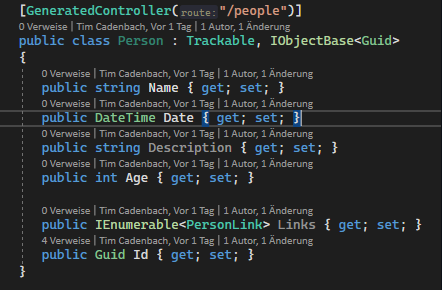
Building your first API is as simple as just adding a class to your project, something along these lines:
   [Api("/people", ApiMethodsToGenerate.All )]
   public class Person :  IObjectBase<Guid>
   {
      public string Name { get; set; }
      public DateTime Date { get; set; }
      public string Description { get; set; }
      public int Age { get; set; }
      public Guid Id { get; set; }
}
The only requirement is that you have to use the IObjectBase<TEntityType> interface. This tells the library which type your primary key has and is used for various things. This requirement might change but the current versions require this.
To turn your class into an API just add the ApiAttribute as seen above and set the route to whatever you want it to be. (Needs to start with trailing / )
The second parameter controls which API Methods should be available.
Just start your project now and you'll be greeted by Swagger Docs showing you the docs for your API and you can start using it, it should already work :)
Configure the Database
Per default the project uses an InMemory Database Provider, good for development but probably you want to change that quickly. Nothing easier than that :9
Add this to your AppSettings:
  "Api": {
    "Database": {
      "DatabaseType": "SQL"
    }
  }
And additionally the connection string:
  "ConnectionStrings": {
    "ApiGeneratorDatabase": "Server=localhost;database=tcdev_dev_222;user=sa;password=Password!23;"
  },
Make sure the name is "ApiGeneratorDatabase" as this is a requirement right now.
If you start your project again it should now use your database and should have it automatically created.
If you want to have migrations automatically applied just add this to startup:
app.UseApiGenerator();
app.UseAutomaticAPIMigrations(true);
This is first of all everything you "have" to do...but theres more you can do
Configure your api even further
The lib comes with 2 helper classes you can use to have things cleaner. "Trackable" and "SoftDeletable".
- Trackable adds two new fields to the database "CreatedAt" and "UpdatedAt" and handles everything automatically.
- SoftDeletable does probably what you think it does, items are not deleted but just "marked" as deleted
Customize behaviour
You can add various interfaces to your class to inject custom functionality, currently called Hooks. For every method theres a Before and After Hook, similar to this:
   [Api("/people", ApiMethodsToGenerate.All )]
   public class Person : Trackable,
      IObjectBase<Guid>,
      IBeforeUpdate<Person>, // Before Update Hook
      IBeforeDelete<Person>, // BeforeDelete Hook
{
Implementing the interface allows you to intercept whats happening and add custom functionality, like in this example:
      public Task<Person> BeforeUpdate(Person newPerson, Person oldPerson)
      {
         newPerson.Age = 333;
return Task.FromResult(newPerson);
}
..more to come
Last but not least, customize database layout
To customize the table and how your model looks in the database you can use classic EntityFramework functionality.
Just add the IEntityTypeConfiguration interface and you can use all the EntityFramework options like here:
   [Api("/people", ApiMethodsToGenerate.All )]
   public class Person : Trackable,
      IObjectBase<Guid>,
      IEntityTypeConfiguration<Person> // Configure Table Options yourself
   {
      public void Configure(EntityTypeBuilder<Person> builder)
      {
         builder.ToTable("MyFancyTableName");
         //....all the other EF Core Options
      }
way more to come....add issues and discussions to github! See you soon